API Gateway URL🔗
The Razorpay API Gateway URL is https://api.razorpay.com/v1.
You need to include this before each API endpoint to make API calls.
New API Version:
We are introducing a new version of APIs for Payment Links. This will be available from 01 Sep 2020.
Old API URL:
The Legacy API Contract will be deprecated on 31st March 2021 15th August 2021. Raise a request with our support team to enable the new version of the app on your account. We will be enabling the new version for you post July end.
https://api.razorpay.com/v1/invoices
New API URL: https://api.razorpay.com/v1/payment_links
Some of the existing request and response parameters have changed and new ones have been added.
Pass this information to your developers and ask them to change your integration accordingly.
Payment Links help you to receive payments from customers by sending them links via email, SMS, chatbots and more. You can easily set up and use Payment Links with these APIs:
Create a Payment Link
Enable Partial Payments
Update a Payment Link
Cancel a Payment Link
Fetch Payment Links
Resend Notifications
Ensure you have read the product document before you proceed with the API integration.
Amount must be in Currency Subunits:
Ensure that the Payment Link amount is in currency subunits. That is, if you are choosing INR as the currency, you must enter the amount in paise. For example, if you want to receive a payment of ₹299.95, you must enter 29995.
The Razorpay API Gateway URL is https://api.razorpay.com/v1.
You need to include this before each API endpoint to make API calls.
All Razorpay APIs are authenticated using Basic Auth. Basic auth requires the following:
[YOUR_KEY_ID][YOUR_KEY_SECRET]Basic auth expects an Authorization header for each request in the Basic base64token format. Here, base64token is a base64 encoded string of YOUR_KEY_ID:YOUR_KEY_SECRET.
Watch Out
The Authorization header value should strictly adhere to the format mentioned above. Invalid formats will result in authentication failures. Few examples of invalid headers are:
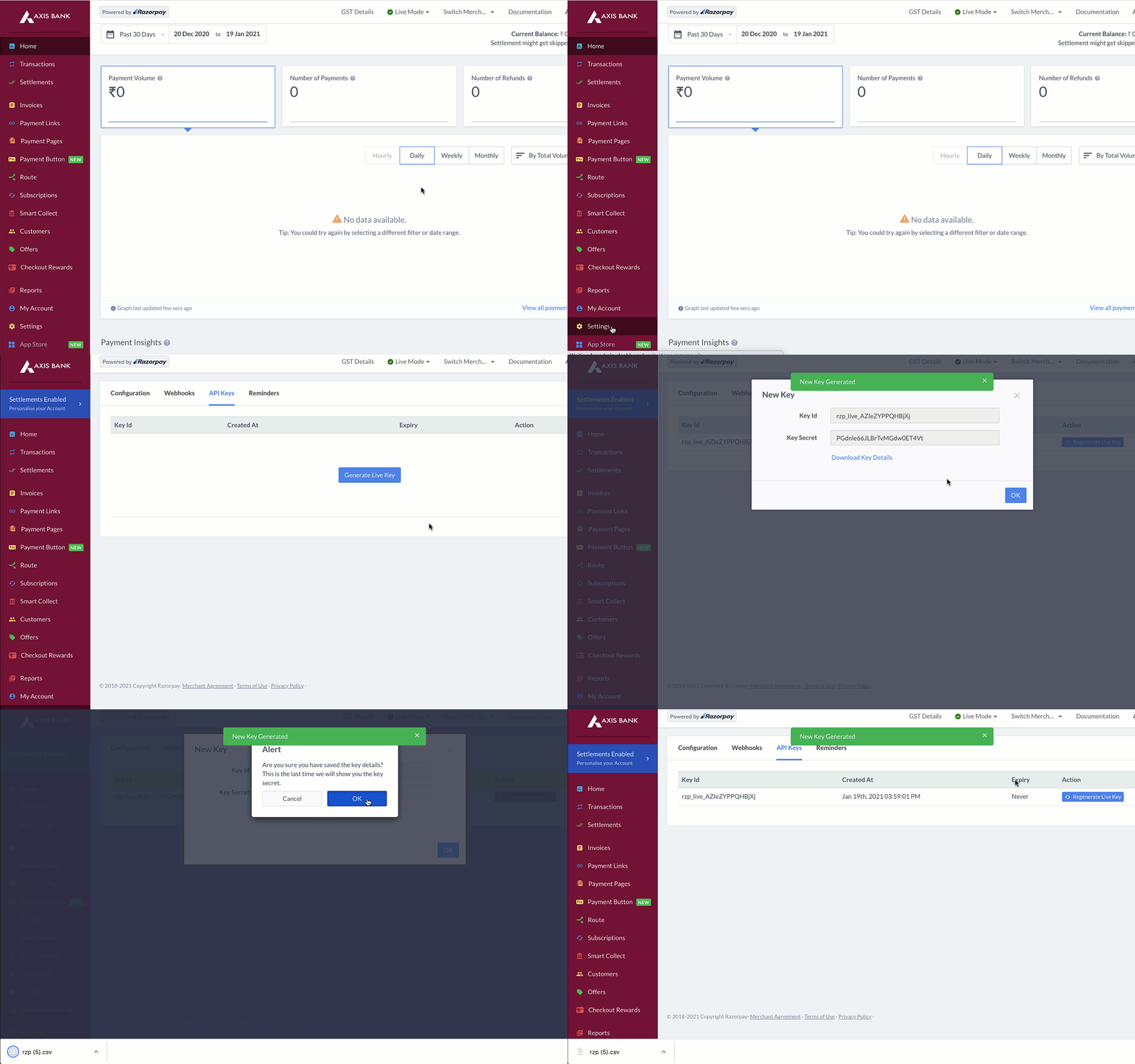
BASIC base64tokenbasic base64tokenBasic "base64token"Basic $base64tokenThe Key Id and Key Secret appear in a pop-out window as shown below:
Watch Out!
Following JSON represents a sample Payment Link entity.
Note:
Payment Link is a solution on our existing Invoices system. Hence, few of the attributes in the response are not applicable for Payment Links.
The following table details some of the attributes related to Payment Links:
idstring Unique identifier of the Payment Link.
entitystring Payment Link uses the Invoices entity.
receiptstring Receipt number tagged to the Payment Link. Must be a unique number for each Payment Link. The maximum character limit supported is 40.
customer_idstring You can pass the customer_id in this field, if you are using Customers API. If not, you can pass the customer object described in the below fields.
customerCustomer details
namestring The customer's name. The maximum character limit supported is 50.emailstring The email address of the customer.contactstring The contact number of the customer.statusstring Displays the current state of the Payment Link. Learn more about the Payment Link Life Cycle.
expire_byinteger Timestamp, in Unix, when the payment link will expire.
issued_atinteger Timestamp, in Unix, at which the Payment Link was issued to the customer.
paid_atinteger Timestamp, in Unix, at which the Payment Link was paid by the customer.
cancelled_atinteger Timestamp, in Unix, at which the Payment Link was cancelled by you.
expired_atinteger Timestamp, in Unix, at which the Payment Link expired.
sms_statusstring Indicates whether the SMS notification for the Payment Link was sent to the customer. Possible values:
pendingsentemail_statusstring Indicates whether the email notification for the Payment Link was sent to the customer. Possible values:
pendingsentpartial_paymentboolean Indicates if partial payments is enabled for the Payment Link. Possible values:
amountinteger Amount to be paid using the Payment Link. Must be in the smallest unit of the currency. For example, if you want to receive a payment of ₹299.95, you must enter the value 29995.
amount_paidinteger Amount paid using the Payment Link.
amount_dueinteger Remaining amount to be paid using the Payment Link.
currencystring Defaults to INR. We accept payments in international currencies.
descriptionstring A brief description of the Payment Link. The maximum character limit supported is 2048.
notesobject User-entered notes for internal reference. This is a key-value pair. You can enter a maximum of 15 key-value pairs.
short_urlstring The unique short URL generated for the Payment Link.
typestring. Here it will be link.
created_atinteger Timestamp, in Unix, indicating when the Payment Link was created.